
Apple releases iOS 27 in September. This year's headline is a reworked Siri powered by what Apple calls "Apple Intelligence." But the update includes a lot more than a smarter voice assistant. Here is what changes, what hardware you need, and which privacy switches to adjust on day one.
Siri AI — The Big Shift
Siri in iOS 27 is context-aware. It can see what is on your screen, reference your messages and calendar, and answer questions about objects in the camera viewfinder. A new "Siri" mode in the Camera app identifies plants, food, landmarks, and even reads flyers to add calendar events.
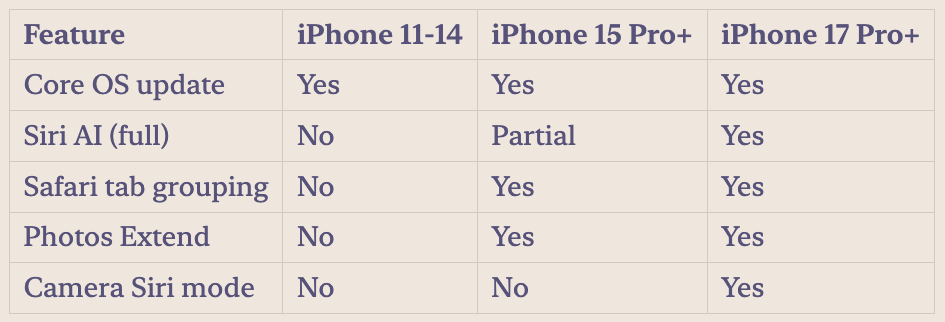
This processing happens mostly on-device. That is good for privacy. The trade-off is hardware requirements: the full Siri AI experience needs an iPhone 17 Pro, iPhone 17 Pro Max, or the iPhone Air. If you have an iPhone 15 Pro or iPhone 16, you get a subset of features. The base update supports iPhone 11 and later, but the AI-specific capabilities taper off on older silicon.
Safari Tab Grouping and Photos Clean Up
Safari now uses Apple Intelligence to automatically organize open tabs into topics. If you have fifteen tabs about a vacation and ten about a home project, Safari groups them without you lifting a finger. Tap the three-line icon in Tab View and enable "Automatically Create Topics."
Photos gets an "Extend" option that uses AI to fill in edges of cropped images — useful when a photo does not quite match your Lock Screen aspect ratio. The feature generates matching background content that blends with the original.
Privacy Defaults to Check
Apple's privacy stance with on-device processing is generally strong. But a few defaults in iOS 27 are worth changing:
- Mail Smart Replies — Off by default in beta 5. Turn it on in Settings > Mail if you want AI-suggested replies, but know Apple processes the email content.
- Siri AI cloud fallback — When the on-device model cannot answer, Siri may send your request to Apple's servers. Check Settings > Apple Intelligence & Siri > Siri AI to see what data gets shared.
- Photos Extend — The AI-generated image content is created on-device, but review what it generates. AI fill is good, not perfect.
Compatibility quick reference:
Actionable steps:
- Check which iPhone model you have — Settings > General > About.
- When iOS 27 ships next month, go to Settings > Apple Intelligence & Siri first.
- Turn off any cloud-processing options you are not comfortable with.
- Explore the Camera app's new Siri mode if you have a 17 Pro or newer.
- Enable automatic Safari tab grouping in Tab View settings.
Sources: macrumors.com, macworld.com, theverge.com