Table of Contents
- Two Architectures, Two Philosophies
- Where Apple Silicon Wins
- Where NVIDIA Still Dominates
- The Real-World Decision Guide
- The Bottom Line
If you'd said five years ago that the most debated hardware question in AI would be "Mac or GPU?" most people would have laughed. Apple was not in the AI conversation. NVIDIA owned the space.
In 2026, that's flipped. The local AI community is genuinely split between Apple Silicon and NVIDIA, and the choice depends on what you're actually doing.
Two Architectures, Two Philosophies
The fundamental difference comes down to memory architecture.
Apple Silicon uses Unified Memory Architecture (UMA). The same pool of RAM serves the CPU and GPU. A Mac Studio with 192GB of unified memory can load a 70B-parameter model — a model that would need multiple NVIDIA GPUs to run. The tradeoff is bandwidth: Apple's M4 Ultra delivers roughly 1 TB/s of memory bandwidth.
NVIDIA uses discrete GPU memory. An RTX 4090 has 24GB of dedicated VRAM. To run a 70B model, you need multiple GPUs in parallel — expensive, power-hungry, and physically large. The tradeoff is bandwidth: even a single RTX 4090 delivers over 1 TB/s, and the H100 pushes 3.35 TB/s.
So the choice is between capacity (Apple) and speed (NVIDIA). Apple can load bigger models. NVIDIA can run them faster once loaded.
Where Apple Silicon Wins
Apple's unified memory advantage isn't theoretical. It's the reason Macs have become the default recommendation for local AI experimentation.
Bigger models, one machine. A Mac Studio with 192GB can run Llama 3.1 70B, Mixtral 8x22B, and most open-weight models at usable speeds. To do the same on NVIDIA, you'd need at least two RTX 4090s in a workstation — and the VRAM interconnect overhead eats into performance.
Zero configuration for most users. Install Ollama, pull a model, run it. No CUDA toolkit, no driver conflicts, no GPU selection. The Apple Neural Engine and Metal API handle acceleration transparently.
Power efficiency. A Mac Studio at full load draws about 120W. A dual-GPU workstation pushing the same model draws 800W+. For someone running local AI continuously — an agent that processes throughout the day — that power difference adds up.
App ecosystem maturity. By mid-2026, virtually every local AI tool supports Apple Silicon natively. Ollama, LM Studio, MLX, and Open WebUI all have first-class Mac support. The "Mac is forgotten" criticism that was valid in 2023 is obsolete.
Where NVIDIA Still Dominates
NVIDIA's advantages are in the places Apple can't easily compete.
Raw training throughput. If you're fine-tuning models or running large-scale training, NVIDIA is the only practical choice. Apple's MLX framework is improving, but CUDA's maturity and the ecosystem of training libraries mean GPU clusters still dominate.
Real-time inference at high throughput. For production inference serving — generating tokens for many users simultaneously — NVIDIA's bandwidth advantage matters. A single H100 can serve dozens of concurrent requests. A Mac can serve fewer.
CUDA ecosystem maturity. The libraries, tooling, and community around CUDA are twenty years deep. If you need to do something unusual with a model, someone has an NVIDIA solution. The Apple Silicon equivalent may or may not exist.
Multi-GPU scaling. NVIDIA scales predictably from one GPU to thousands. Apple's multi-Mac interconnect is less mature, though growing with Thunderbolt 5 and Apple's private interconnect for data centers.
The Real-World Decision Guide
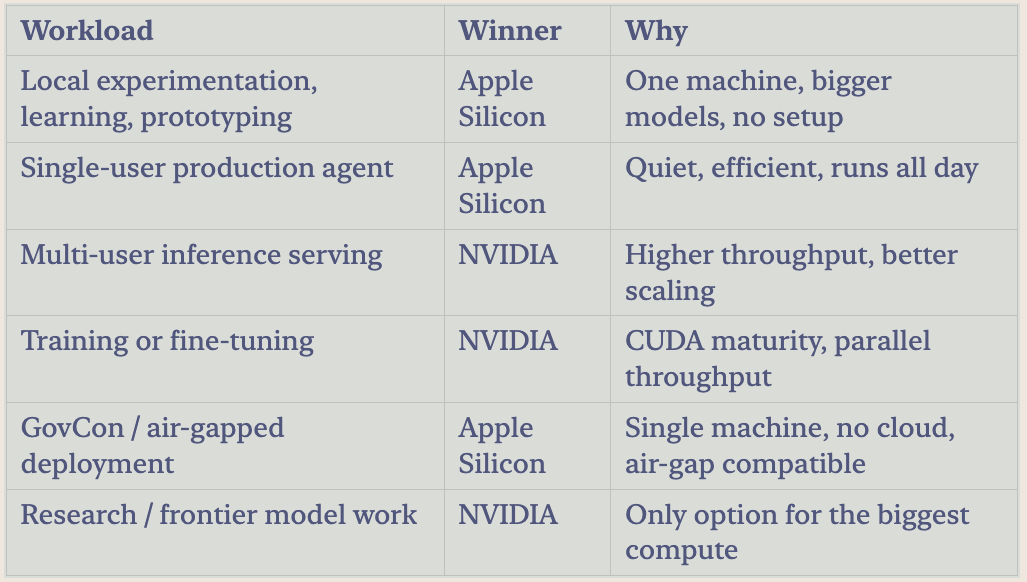
The choice depends on what you're doing:
The Bottom Line
The "Mac vs. GPU" framing is a false choice. They're tools for different parts of the AI workflow. Apple Silicon is the best option for what most professionals need — local, private, practical AI — while NVIDIA remains the choice for production scale and training.
Actionable takeaway: If you own a Mac with Apple Silicon (M2 Pro or better), you already have a capable local AI machine. Download Ollama today, pull a 7B model like Llama 3.1, and run your first local inference. You don't need a GPU. You already have what you need.